
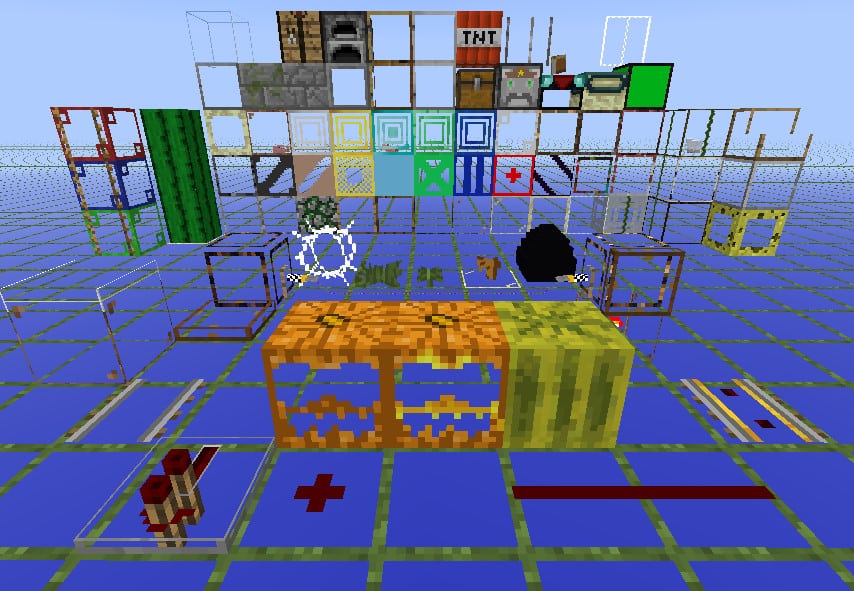
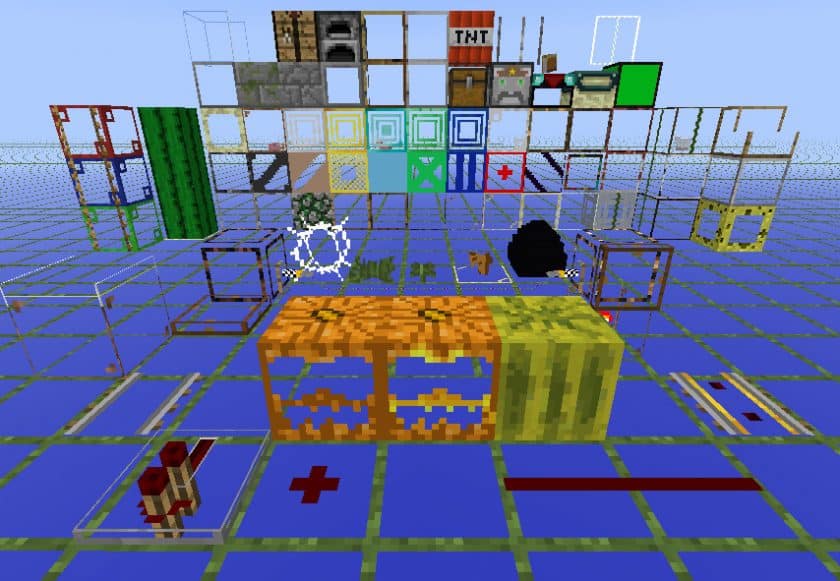
Dropping into a world with the StrongestCraft Resource Pack honestly feels like switching on some kind of x-ray vision. The first thing you notice—can’t miss it—is how transparent almost everything becomes. Blocks stop feeling solid and instead turn into these faint outlines, like the world is showing you its skeleton. And yeah, it’s weird at first. Then it clicks. This pack isn’t trying to look pretty, it’s trying to be smart. The StrongestCraft Resource Pack is built for players who want answers fast—where the ores are, where the dungeons hide, what’s lurking behind that wall of stone you’d normally mine for ten minutes.
Once you start exploring caves or heading deep underground, the whole experience changes. You’re not guessing anymore. You’re scanning. Diamonds, emeralds, ancient debris—suddenly they’re just… there. Floating in view. It feels a bit like cheating, not gonna lie, but also incredibly efficient. The visual style is super minimal, almost holographic, with glowing outlines that keep things readable without clutter. If you’ve ever used packs like Defscape Resource Pack for clarity, this takes that idea and pushes it way further, stripping the world down to pure function.
What’s kinda impressive is how smooth everything stays. Because the textures are simplified and see-through, performance usually stays rock solid, even on older systems. The StrongestCraft Resource Pack supports multiple resolutions too, from 16x up to 64x, so you can tweak it depending on how sharp you want those outlines to look. It reminds me of the no-nonsense mindset behind Default Textures Improved Resource Pack, except here the goal isn’t beauty—it’s speed and visibility.
After a while, you stop seeing StrongestCraft as just a resource pack and more like a tool. A really powerful one. The StrongestCraft Resource Pack turns exploration into something direct and almost surgical, especially for hardcore miners or players grinding resources. It’s a completely different vibe compared to artistic packs like Biophelia Resource Pack, but that’s the point. If your goal is efficiency, clarity, and finding exactly what you’re looking for with zero guesswork, the StrongestCraft Resource Pack delivers that experience unapologetically.
| Minecraft Version | Compatibility |
|---|---|
| 1.8.1 | ✅ Supported |
| 1.8.6 | ✅ Supported |
| 1.8 | ✅ Supported |
| 1.7.10 | ✅ Supported |
| 1.7.9 | ✅ Supported |
| 1.7.4 | ✅ Supported |
| 1.7 | ✅ Supported |
| 1.6.4 | ✅ Supported |
| 1.6.2 | ✅ Supported |
StrongestCraft – Screenshots & Videos
How to Install Texture Pack (Simple 10 Steps)
- Download Optifine: Most of the texture packs and shaders need Optifine. That’s why, first download and install Optifine for the version of Minecraft you want to play.
- Download the Texture Pack: Get the texture pack you want from the download section. Choose the version that works with your Minecraft and your PC’s performance.
- Open Minecraft Launcher: Start Minecraft using the official game launcher – or even TLauncher, if you use that.
- Go to Options: From the main menu, click on the “Options” button.
- Open Resource Packs: Inside Options, click on “Resource Packs…”.
- Open the Resource Pack Folder: Click on “Open Resource Pack Folder” – this will open a folder named “resourcepacks”.
- Move the Pack File: Copy or move the .zip file you downloaded into that “resourcepacks” folder. (Don’t unzip the file – Minecraft uses it as-is!)
- Go Back and Refresh: Close the folder and click “Done”, then go back into “Resource Packs…” again.
- Activate the Pack: You’ll see the pack on the left side. Hover over it and click the arrow to move it to the right (active side). Tip: If you get a message that the pack is for a different version, just click “Yes” – it usually works fine.
- Click Done and Enjoy: Click “Done” again. Now your pack is ready to use in-game. It’s that easy!
Download
(16x-64x) (1.8) (1.7) Download StrongestCraft (Default) Resource Pack
(16x-64x) (1.8) (1.7) Download StrongestCraft (F&MF) Resource Pack
- “F&MF” stands for “(Nether) Fortress and Mycelium Finder”. This makes underwater fortresses and mycelium islands/blocks MUCH easier to spot from a distance, but since it makes them completely solid, you won’t be able to see them once you get to them.
(16x-64x) (1.8) (1.7) Download StrongestCraft (Informal) Resource Pack
- The casual version makes dirt, grass, rock, and sand completely solid and normal. Great for beginners or if you are in an area with lots of holes or gullies in the ground.
Download Instructions
- CurseForge: If the pack is hosted on CurseForge, the download will begin automatically after a few seconds. If it does not start, use the “Download” button shown on the page.
- Modrinth: If the download is from Modrinth, click the file version that matches your Minecraft build, then press the Download button. Modrinth usually offers multiple releases, so make sure you pick the correct version before installing.
- Mediafire: On Mediafire, click the large blue Download button to start the file download. Avoid any extra pop-ups or buttons that are not related to the direct download.
- Google Drive: For Google Drive, click the small download icon at the top right corner of the page. It looks like a downward arrow. The file will be saved to your computer immediately.
Disclaimer We do not create or modify any of the texture packs or shader packs shared on this website. All credit goes to the original creators, and every download link we provide is the official link from their page, which keeps all downloads safe. Some links may stop working after updates, so if you find a broken one, let us know in the comments and we will update it quickly. If you like a pack, consider supporting the creator by visiting their official page or website that we have linked below, and feel free to leave a comment or vote to help their work reach more players.
