
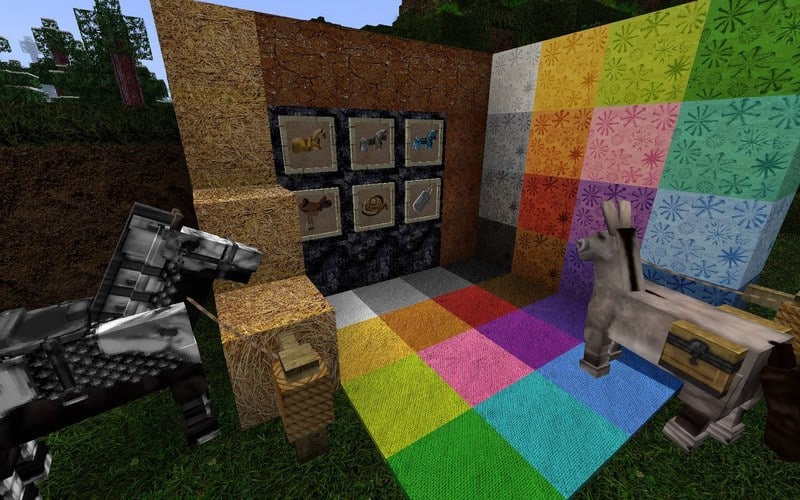
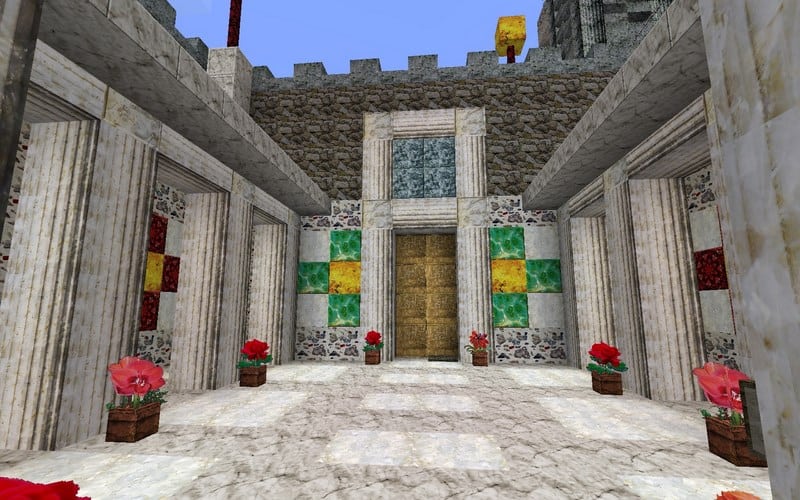
Stepping into a Minecraft world with the MojoKraft Realistic resource pack is like rediscovering the familiar through a breathtaking, high-definition lens. This pack transforms the game’s visuals into an astonishingly detailed and immersive experience, carefully crafting textures from high-definition photographs. It’s not merely about increasing pixel density; it’s about infusing every block and item with a sense of tangibility and depth. Imagine exploring a dense forest where tree bark showcases intricate lines and realistic shadows, and foliage sways with a natural, organic feel. Stone formations reveal subtle imperfections and varying hues, making mining a journey through geological artistry rather than uniform blocks.
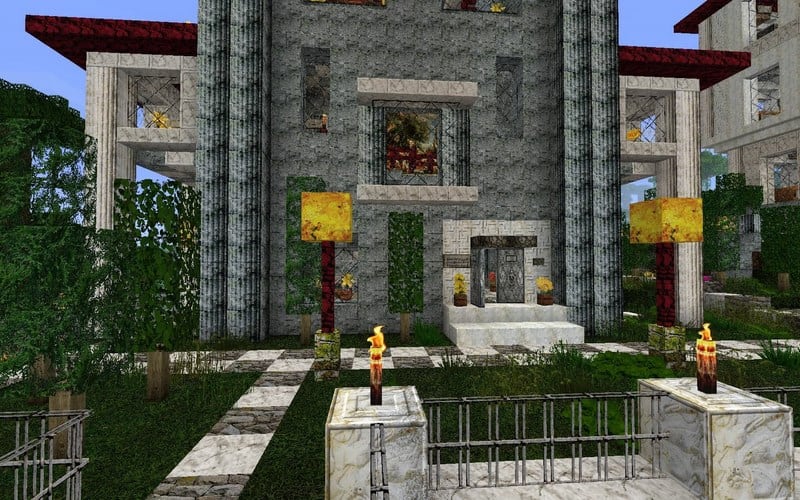
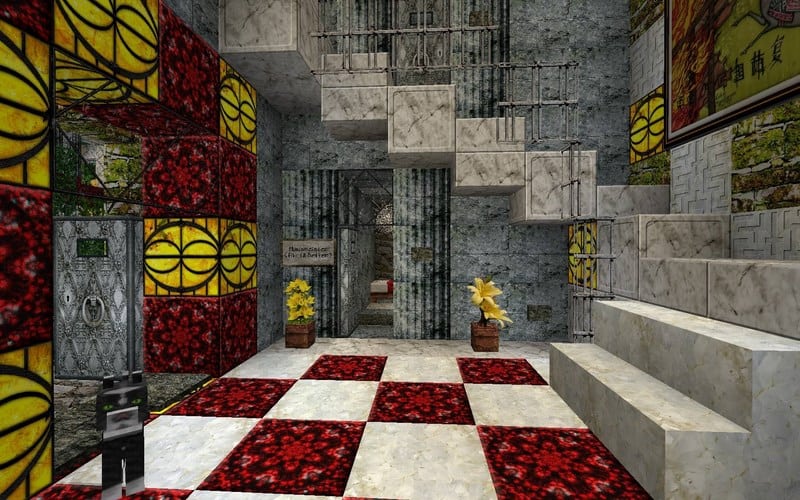
What truly sets MojoKraft Realistic apart is its unique blend of photorealism with a rustic charm. While the textures are incredibly detailed, they retain a certain warmth and handcrafted quality, preventing the game from feeling overly sterile or artificial. Buildings constructed with this pack take on an aged, lived-in character, where wooden planks clearly show their grain and wear, and cobblestone paths seem to whisper tales of countless footsteps. Sunlight filters through leaves with a softened, almost painterly glow, casting realistic shadows that deepen the sense of atmosphere. Even the simplest elements, like dirt or grass, are given meticulous attention, making the terrain richer and more varied.
Players will notice significant enhancements in environmental details, from the shimmering reflections on water surfaces to the nuanced textures of various ore blocks. This resource pack excels at bringing a renewed sense of wonder to both exploration and construction within Minecraft. While it delivers stunning high-resolution visuals, ranging from 64x to an incredibly sharp 512x, it’s designed to provide a smooth, enjoyable experience, though players aiming for the highest resolutions will benefit from a more capable system. MojoKraft Realistic breathes new life into Minecraft, making every landscape, every structure, and every adventure feel more authentic and visually captivating.
| Minecraft Version | Compatibility |
|---|---|
| 1.12.2 | ✅ Supported |
| 1.12 | ✅ Supported |
| 1.11.2 | ✅ Supported |
| 1.11 | ✅ Supported |
| 1.10.2 | ✅ Supported |
| 1.10 | ✅ Supported |
| 1.9.4 | ✅ Supported |
| 1.9 | ✅ Supported |
| 1.8.1 | ✅ Supported |
| 1.8.6 | ✅ Supported |
| 1.8 | ✅ Supported |
| 1.7.10 | ✅ Supported |
| 1.7.9 | ✅ Supported |
| 1.7.4 | ✅ Supported |
| 1.7 | ✅ Supported |
MojoKraft Realistic – Screenshots
How to Install Texture Pack (Simple 10 Steps)
- Download Optifine: Most of the texture packs and shaders need Optifine. That’s why, first download and install Optifine for the version of Minecraft you want to play.
- Download the Texture Pack: Get the texture pack you want from the download section. Choose the version that works with your Minecraft and your PC’s performance.
- Open Minecraft Launcher: Start Minecraft using the official game launcher – or even TLauncher, if you use that.
- Go to Options: From the main menu, click on the “Options” button.
- Open Resource Packs: Inside Options, click on “Resource Packs…”.
- Open the Resource Pack Folder: Click on “Open Resource Pack Folder” – this will open a folder named “resourcepacks”.
- Move the Pack File: Copy or move the .zip file you downloaded into that “resourcepacks” folder. (Don’t unzip the file – Minecraft uses it as-is!)
- Go Back and Refresh: Close the folder and click “Done”, then go back into “Resource Packs…” again.
- Activate the Pack: You’ll see the pack on the left side. Hover over it and click the arrow to move it to the right (active side). Tip: If you get a message that the pack is for a different version, just click “Yes” – it usually works fine.
- Click Done and Enjoy: Click “Done” again. Now your pack is ready to use in-game. It’s that easy!
Download
Addon MojoKraft v16 (use any Mojokraft v15 as base pack)
- (64x) (1.12) Download MojoKraft Realistic Addon Pack
- (128x) (1.12) Download MojoKraft Realistic Addon Pack
- (256x) (1.12) Download MojoKraft Realistic Addon Pack
- (384x) (1.12) Download MojoKraft Realistic Addon Pack
- (512x) (1.12) Download MojoKraft Realistic Addon Pack
MojoKraft v15
- (64x) (1.11) Download MojoKraft Realistic Resource Pack
- (128x) (1.11) Download MojoKraft Realistic Resource Pack
- (256x) (1.11) Download MojoKraft Realistic Resource Pack
- (384x) (1.11) Download MojoKraft Realistic Resource Pack
- (512x) (1.11) Download MojoKraft Realistic Resource Pack
MojoCraft v14
- (64x) (1.10) (1.9) Download MojoKraft Realistic Resource Pack
- (128x) (1.10) (1.9) Download MojoKraft Realistic Resource Pack
- (256x) (1.10) (1.9) Download MojoKraft Realistic Resource Pack
- (384x) (1.10) (1.9) Download MojoKraft Realistic Resource Pack
- (512x) (1.10) (1.9) Download MojoKraft Realistic Resource Pack
MojoKraft v12
- (64x) (1.8) (1.7) Download MojoKraft Realistic Resource Pack
- (128x) (1.8) (1.7) Download MojoKraft Realistic Resource Pack
- (256x) (1.8) (1.7) Download MojoKraft Realistic Resource Pack
- (384x) (1.8) (1.7) Download MojoKraft Realistic Resource Pack
- (512x) (1.8) (1.7) Download MojoKraft Realistic Resource Pack
Download Instructions
-
CurseForge: If the pack is hosted on CurseForge, the download will begin automatically after a few seconds. If it does not start, use the “Download” button shown on the page.
-
Modrinth: If the download is from Modrinth, click the file version that matches your Minecraft build, then press the Download button. Modrinth usually offers multiple releases, so make sure you pick the correct version before installing.
-
Mediafire: On Mediafire, click the large blue Download button to start the file download. Avoid any extra pop-ups or buttons that are not related to the direct download.
-
Google Drive: For Google Drive, click the small download icon at the top right corner of the page. It looks like a downward arrow. The file will be saved to your computer immediately.
Disclaimer We do not create or modify any of the texture packs or shader packs shared on this website. All credit goes to the original creators, and every download link we provide is the official link from their page, which keeps all downloads safe. Some links may stop working after updates, so if you find a broken one, let us know in the comments and we will update it quickly. If you like a pack, consider supporting the creator by visiting their official page or website that we have linked below, and feel free to leave a comment or vote to help their work reach more players.
