
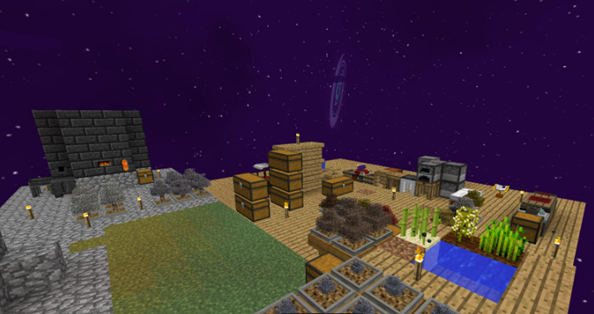
SkyFactory 4 is not about exploration like normal survival worlds. It is about progression. Every resource is unlocked through systems like sieving, tree farming, automation, and machines. The pack combines technology mods, magic mods, and quality-of-life features into one balanced experience.
What makes SkyFactory 4 special is that it guides you instead of leaving you lost. The built-in advancement system gives you clear goals so you always know what to do next. You are free to choose your own playstyle, but you are never stuck wondering how to progress.
This is why SkyFactory 4 is still recommended years after release.
Step-by-Step Installation Guide (Beginner Friendly)
Installing SkyFactory 4 is simple if you follow the steps in order.
Step 1: Make Sure Minecraft and Java Are Ready
-
You must own Minecraft Java Edition
-
Install 64-bit Java on your system
-
Restart your PC after installing Java to avoid launcher issues
Using 64-bit Java is important because modpacks need more memory than vanilla Minecraft.
Step 2: Install the CurseForge Launcher
SkyFactory 4 is officially distributed through CurseForge.
-
Download and install Overwolf
-
Inside Overwolf, install the CurseForge app
-
Open CurseForge and select Minecraft
-
Search for SkyFactory 4
-
Click Install and wait for files to download
Do not manually move mods or folders. CurseForge handles everything automatically.
Step 3: First Launch Settings
Before clicking Play, open the modpack settings inside CurseForge.
-
Allocate at least 6 to 8 GB of RAM
-
Close unnecessary background apps
-
Keep the launcher open during the first launch
The first startup may take longer than normal. This is expected.
First-Time In-Game Setup Guide
Once the game loads, do not rush. A few early steps make a big difference.
Adjust Video Settings
-
Render Distance: 8 to 10 chunks
-
Graphics: Fast
-
Particles: Decreased
-
VSync: Enabled
These settings help stabilize FPS, especially on mid-range systems.
Starting the World Correctly
When creating a world:
-
Choose the SkyFactory 4 world type
-
Keep cheats disabled unless you want creative testing
-
Let the world generate fully before moving
You will spawn on a small platform with a tree. This is normal.
Early Game Progression Basics
Your First Tree and Resources
Break the starting tree and craft basic tools. Wood is your most important early resource, so replant saplings immediately.
Using the Sieve System
Sieving is how you unlock most materials.
-
Craft a Sieve
-
Use Dirt to get seeds and pebbles
-
Progress to Sand and Gravel later
This system replaces mining in SkyFactory.
Follow the Advancement Book
SkyFactory 4 includes a built-in guide that acts as your progression map. Each completed task unlocks the next step. This removes guesswork and makes the modpack approachable for beginners.
Performance Requirements and Optimization Tips
SkyFactory 4 is heavier than vanilla Minecraft, so performance matters.
Recommended PC Specs
-
CPU: Intel i5 or Ryzen 5 and above
-
GPU: GTX 1050 Ti, GTX 1060, or RX 570 or better
-
RAM: 8 GB minimum, 16 GB recommended
Lower-end systems can still run the pack with optimized settings.
Best RAM Allocation
Inside CurseForge settings:
-
Minimum RAM: 4 GB
-
Maximum RAM: 8 GB
Avoid allocating all your system memory. Leave some for Windows.
FPS Improvement Tips
-
Keep chunk loaders limited
-
Avoid massive mob farms early
-
Disable fancy animations if needed
-
Restart the game every few hours
Long play sessions can slowly reduce performance due to memory usage.
Additional Gameplay Tips for Smooth Progression
-
Automate wood production early using tree farms
-
Build a mob farm as soon as possible for loot and XP
-
Use Tinkers’ Construct tools instead of vanilla tools
-
Expand your platform slowly to avoid accidental falls
-
Back up your world before major automation setups
SkyFactory 4 rewards planning more than speed.
Download and Final Notes
SkyFactory 4 remains one of the best skyblock modpacks available. It offers long-term progression, clear goals, and endless automation possibilities without overwhelming new players.
If you enjoy modded Minecraft and want a structured skyblock experience, this pack is still one of the strongest choices you can make.
Shaders That Work Well With SkyFactory 4
Shaders can be used with SkyFactory 4 if your PC can handle them. Lighter shaders are recommended because automation-heavy bases already use system resources.
Good options include:
-
BSL Shaders on Low settings
-
Sildur’s Vibrant Shaders Lite
-
Chocapic13 Low or Medium
Heavier shaders can work, but expect FPS drops once your base grows. This section is ideal for internal shader links later.
