The Nightly Resource Pack offers a unique approach to enhancing your Minecraft experience, focusing not on aesthetic overhauls but on crucial utility. Unlike many texture packs that transform the look of blocks and items, Nightly dedicates itself to solving one of Minecraft’s most persistent challenges: darkness. This pack injects a subtle yet powerful nighttime illumination into your world, making previously obscure areas clear and navigable. It’s perfect for players who love the vanilla Minecraft aesthetic but find themselves struggling with visibility during the game’s darker hours.
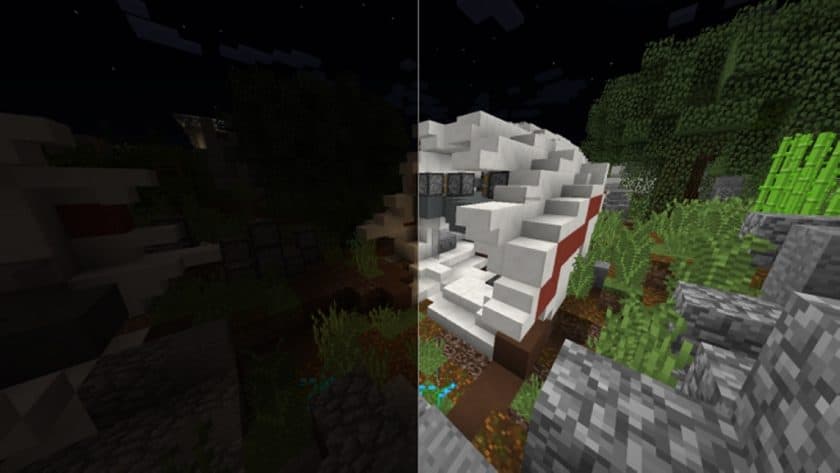
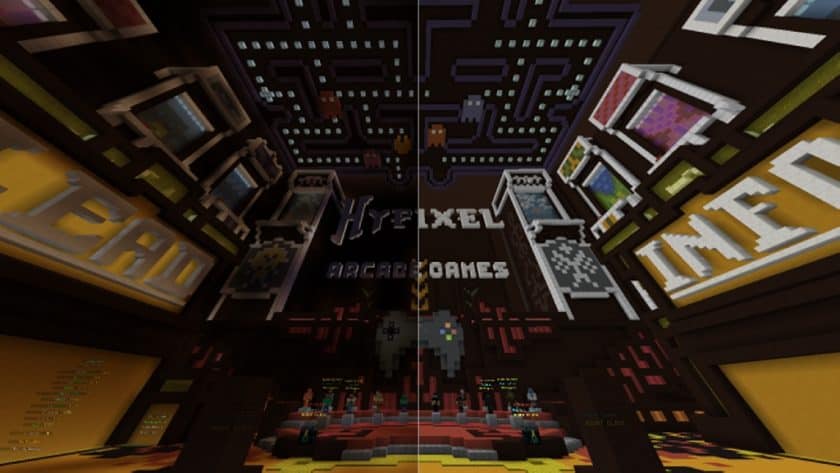
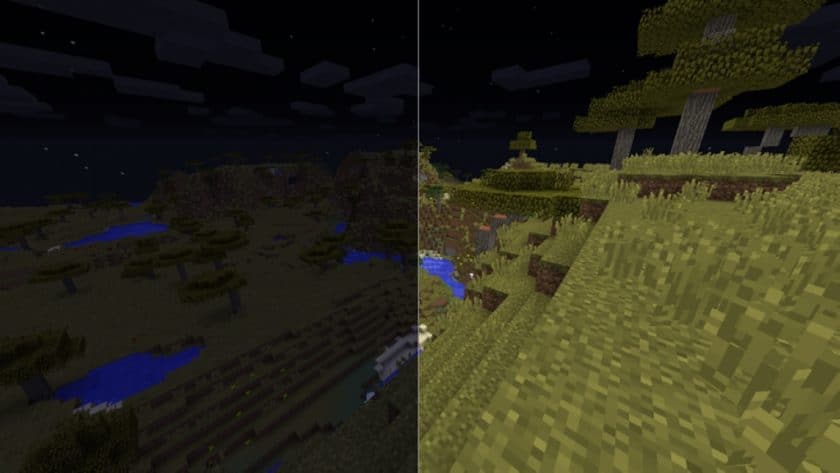
Exploring the world with Nightly activated feels akin to having a permanent night vision potion, yet it achieves this effect through clever modifications to the game’s color and light maps rather than traditional shader effects. The pack adjusts the color filter that dictates nighttime light levels and shadow intensity, resulting in significantly brighter environments and reduced shadow depth. This isn’t just a simple gamma boost; it’s a sophisticated tweak that genuinely improves your ability to perceive your surroundings, giving you an edge in combat, exploration, and building.
The practical advantages of the Nightly Resource Pack are immediately apparent. In PvP scenarios, you’ll gain a crucial advantage by spotting opponent players more quickly. Venturing out after dark becomes far less daunting, allowing you to identify and combat nighttime mobs with greater ease, or simply continue exploring the vast landscapes. Builders will appreciate the enhanced visibility in dimly lit structures or underground caverns, making intricate work less frustrating. For players with lower-luminance monitors, where dark areas often become impenetrable black voids, Nightly can be a game-changer, making the nighttime Minecraft experience genuinely enjoyable.
Despite its impactful visual enhancement, Nightly maintains excellent game performance. Since it primarily modifies lighting maps rather than introducing new, high-resolution textures, it retains the game’s default 16x resolution. This means virtually any computer capable of running vanilla Minecraft will run Nightly without a hitch. The pack is designed to work seamlessly across a wide array of Minecraft Java Edition versions, from 1.8 all the way up to 1.16.5, though it does require Optifine for optimal functionality. It’s important to note that Nightly focuses solely on lighting and is not compatible with shaders, as their lighting adjustments would conflict. This resource pack is truly about clarity, ensuring your adventures never have to stop when the sun goes down.
Nightly is compatible with all of the following Minecraft versions: 1.21.11 – 1.21.10 – 1.21.9 – 1.21.8 – 1.21.7 – 1.21.6 – 1.21.5 – 1.21.4 – 1.21.3 – 1.21.2 – 1.21.1 – 1.21 – 1.20.6 – 1.20.5 – 1.20.4 – 1.20.3 – 1.20.2 – 1.20.1 – 1.20 – 1.19.4 – 1.19.3 – 1.19.2 – 1.19.1 – 1.19 – 1.18.2 – 1.18.1 – 1.18 – 1.17.1 – 1.17 – 1.16.5 – 1.16.4 – 1.16.3 – 1.16.2 – 1.16.1 – 1.16 – 1.15.2 – 1.15.1 – 1.15 – 1.14.4 – 1.14.3 – 1.14.2 – 1.14 – 1.13.2 – 1.13.1 – 1.13 – 1.12.2 – 1.12 – 1.11.2 – 1.11 – 1.10.2 – 1.10 – 1.9.4 – 1.9 – 1.8.9 – 1.8.8 – 1.8.1 – 1.8.6 – 1.8
Nightly Resource Pack – Screenshots
How to Install Texture Pack (Simple 10 Steps)
- Download Optifine: Most of the texture packs and shaders need Optifine. That’s why, first download and install Optifine for the version of Minecraft you want to play.
- Download the Texture Pack: Get the texture pack you want from the download section. Choose the version that works with your Minecraft and your PC’s performance.
- Open Minecraft Launcher: Start Minecraft using the official game launcher – or even TLauncher, if you use that.
- Go to Options: From the main menu, click on the “Options” button.
- Open Resource Packs: Inside Options, click on “Resource Packs…”.
- Open the Resource Pack Folder: Click on “Open Resource Pack Folder” – this will open a folder named “resourcepacks”.
- Move the Pack File: Copy or move the .zip file you downloaded into that “resourcepacks” folder. (Don’t unzip the file – Minecraft uses it as-is!)
- Go Back and Refresh: Close the folder and click “Done”, then go back into “Resource Packs…” again.
- Activate the Pack: You’ll see the pack on the left side. Hover over it and click the arrow to move it to the right (active side). Tip: If you get a message that the pack is for a different version, just click “Yes” – it usually works fine.
- Click Done and Enjoy: Click “Done” again. Now your pack is ready to use in-game. It’s that easy!
Download
(16x) (1.21.x – 1.8.x) Download the Nightly Resource Pack
Official links:
Check out the Nightly Resource Pack on the official resource
Download Instructions
- CurseForge: If the pack is hosted on CurseForge, the download will begin automatically after a few seconds. If it does not start, use the “Download” button shown on the page.
- Modrinth: If the download is from Modrinth, click the file version that matches your Minecraft build, then press the Download button. Modrinth usually offers multiple releases, so make sure you pick the correct version before installing.
- Mediafire: On Mediafire, click the large blue Download button to start the file download. Avoid any extra pop-ups or buttons that are not related to the direct download.
- Google Drive: For Google Drive, click the small download icon at the top right corner of the page. It looks like a downward arrow. The file will be saved to your computer immediately.
Disclaimer: We do not create or modify any of the texture packs or shader packs shared on this website. All credit goes to the original creators, and every download link we provide is the official link from their page, which keeps all downloads safe. Some links may stop working after updates, so if you find a broken one, let us know in the comments and we will update it quickly. If you like a pack, consider supporting the creator by visiting their official page or website that we have linked below, and feel free to leave a comment or vote to help their work reach more players.